Most SEO work assumes the pages you're working on are in Google's index. They often aren't. Teams spend weeks rewriting titles, building backlinks, restructuring content for pages Google never saw, never kept, or quietly dropped during the last update.
An index check is the cheapest, fastest, most underused diagnostic in SEO. Five minutes per priority list. Zero ambiguity in the result. Either Google has the page or it doesn't, and if it doesn't, every other optimisation you ship for that page returns zero.
This article walks through what indexation actually means, why pages drop out, how to check at scale, and what to do when the answer comes back wrong. It maps onto the Index Checker tool we built at Algorithm, but the diagnostic logic applies whether you use ours or any other.
Crawl, index, rank — three different things people confuse
This is where most teams get stuck before they start. The three steps Google performs on a page get treated as one process. They're not.
Crawling means Googlebot fetched the URL. A 200 response in your server logs and a Googlebot user-agent visit means Google saw the page. That's it. Crawled doesn't equal indexed.
Indexing means Google decided to keep the page after crawling it. The bot rendered the page, evaluated the content, and made a decision: add to the index, discard, or defer. Pages can be crawled repeatedly for months and never get added. The "Crawled — currently not indexed" status in Search Console is exactly this — Google looked, Google said no.
Ranking is what happens after indexing, when someone searches. A page must be indexed to rank. Being indexed doesn't guarantee any particular ranking position. Most non-indexed pages don't rank at zero — they just don't enter the retrieval set at all.
The diagnostic order matters. If a page isn't indexed, every other question is irrelevant until that's fixed. Server logs tell you it was crawled. Only an index check tells you it was kept.
Why pages drop out of Google's index
Several causes, each pointing at a different fix.
The simplest: technical blocks. A noindex meta tag in the HTML head. An X-Robots-Tag: noindex header in the HTTP response. A robots.txt Disallow that prevents crawling entirely. A canonical tag pointing somewhere else. These get pushed during code deployments, theme switches, and CMS migrations, and they often go unnoticed for weeks. In sites I've audited, somewhere around 15% of unexpectedly non-indexed pages trace to a canonical pointing at a paginated archive or a staging URL nobody updated.
Crawl budget exhaustion is the next category. Google allocates a finite crawl budget per site, scaled to server capacity and page importance. Big sites with thousands of low-value URL variants — faceted navigation, pagination, parameter combinations — burn through that budget on noise. Important pages stay in "Discovered — currently not indexed" status, which means Google knows the URL exists but hasn't reached it yet. The fix isn't asking Google to crawl more. It's removing the noise so Google can reach the pages that actually matter.
Content quality signals are the third category, and the most painful one. Google doesn't index every page it crawls. If content offers no unique value — thin pages, duplicates, auto-generated text, near-copies of competitor content — Google can crawl, evaluate, and reject. The "Crawled — currently not indexed" status is the visible symptom. Google looked at the content and chose not to keep it. The signal isn't only per-page either: when a large proportion of a domain reads as low-quality, Google reduces crawl demand for the whole site, which slows new content from being indexed even if individual articles are fine.
Server problems and JavaScript rendering. Consistent 5xx errors, response times above 2-3 seconds, or content that depends on API calls Googlebot can't execute will cause indexation to fail or stall. Any client-side rendered framework — React, Angular, Vue — needs verified server-side rendering or pre-rendering for content-heavy pages, because the bot doesn't execute the same JavaScript pipeline a logged-in user does.
Algorithm updates can also deindex. Google's quality thresholds shift, and pages that were indexed last quarter can disappear after a core update. There's no Search Console notification when this happens. Traffic from the affected page declines silently, and unless somebody runs an index check, it can stay invisible for months while everyone assumes the page is still in Google's eyes.
How to actually check at scale
Several methods exist. They're not equivalent.
The site: operator is the quickest. Type site:yourdomain.com/specific-url into Google. If the result appears, the page is probably indexed. The catch is Google's own warnings on this — site: results aren't authoritative, they're approximations, and they regularly miss pages that are indexed or include pages that aren't. Useful for a quick spot-check on one URL. Not useful for any list bigger than ten.
URL Inspection in Search Console gives the most authoritative single-URL answer. Coverage status, last crawl date, canonical Google chose, indexing decision. Three problems with it: only works on properties you own, processes one URL at a time, and it's slow enough that running 100 URLs through it is half a working day.
The Page Indexing report in Search Console gives the site-wide overview with status categories and example URLs. Useful for spotting patterns. Not useful for verifying specific URLs you actually care about — the report doesn't let you query "is this exact URL in or out".
A bulk index checker fills the gap none of those cover. The use case is "I have 200 URLs and I need to know which are indexed, right now, without doing 200 manual checks." That's what we built the Index Checker for.
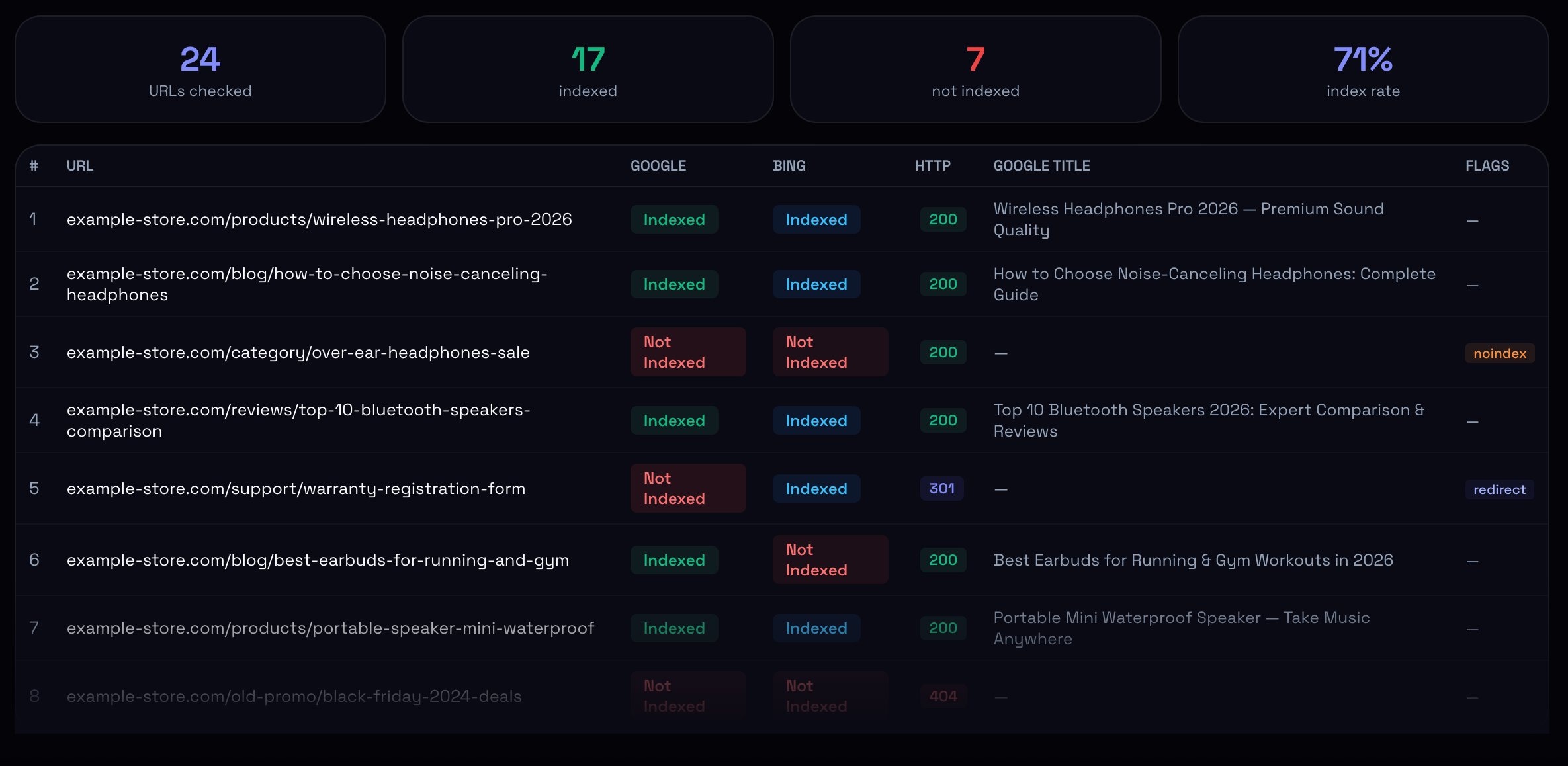
Paste your URLs, pick engine (Google, Bing, or both), get back a per-URL table with: indexed status, HTTP response code, the page title Google shows in search, and a flag column that catches noindex, redirect, and 4xx/5xx responses automatically. Summary header up top — total checked, indexed count, not-indexed count, and an index rate percentage.
The Bing toggle matters more than people expect. Bing tends to index new content faster than Google, and ChatGPT search currently routes through Bing's index. If a page is indexed in Google but not Bing, it might still be invisible inside ChatGPT search results. The reverse case is rarer but real — pages indexed in Bing but missing from Google usually have a discoverable problem on the Google side specifically, which narrows the diagnosis fast.
What to do when the check comes back negative
The diagnosis usually sits in the same row as the result.
If the HTTP column shows 4xx or 5xx, the issue is access. Fix the response code first. The page can't be indexed if it can't be fetched.
If the HTTP code is 200 but the flag column shows noindex, somebody pushed a noindex meta tag or X-Robots-Tag header. Most common after deployments and CMS theme updates. Remove the directive, request re-indexing through URL Inspection, expect the page to return within one crawl cycle.
If the HTTP code is a 301, Google indexes the destination URL, not the redirect source. That's expected behaviour, not a bug. Worth confirming the destination is the URL you actually wanted indexed in the first place.
If the response is 200, no noindex, no redirect, but the page still isn't indexed — the issue is either content quality or crawl budget. Pull up the page. Read it the way Google's quality raters would. Is there unique value? Is the content substantive enough to justify a separate URL? If yes, the issue is more likely crawl budget — the page hasn't been reached yet, or hasn't been crawled recently enough to enter the current index. Strengthen internal linking to it, prune crawl-budget-wasting URLs elsewhere on the site, request indexing through URL Inspection.
If the page reads as thin, generic, or duplicate, the issue is content. Either expand it with original information — specific examples, real numbers, first-hand experience — or merge it into a stronger related page with a 301. Thin pages that survive a content evaluation almost never recover on their own. They need real improvement or removal.
A note on the Indexing API, because it comes up: don't use it for general web pages. Google's documentation restricts it to pages with JobPosting or BroadcastEvent structured data. Using it on regular content violates the API terms and can revoke your quota. The button in URL Inspection is the right path for one-off pages.
Index bloat: the other half of the same problem
The indexation conversation usually focuses on pages that should be indexed but aren't. The reverse case is just as damaging, and most teams never look at it.
Index bloat is when sites get too many URLs into Google's index — parameter variants, empty filter pages, tag archives, internal search result URLs, paginated archives with hundreds of slices. Programmatic SEO sites are the most common offenders, but any large site without strict URL hygiene accumulates bloat over time.
The damage is twofold. Junk pages waste crawl budget, so important pages get crawled less often. And the average quality signal of the domain drops, because Google reads fifty thin parameter URLs as part of the same property as your good ones. The fix: identify the bloat through a bulk check on the full URL list, then remove or block the offenders — robots.txt, noindex meta, or full URL removal depending on case.
Running an index check on the URLs you want indexed alongside the URLs you don't tells you both sides of the problem in one report. If the indexed count is significantly higher than the count of pages you actually care about, you have bloat regardless of whether you knew it.
Why this can't be a one-off check
Index status changes constantly. Code deployments. CMS upgrades. Algorithm updates. Server reconfigurations. CDN setting changes. Theme switches. Plugin updates that override robots.txt. A canonical tag rewrite somebody approved without realising what it touched. Any of these can deindex pages silently, with no notification anywhere.
Industry data suggests pages not crawled within roughly 100-140 days are at increasing risk of falling out of the index. The exact threshold varies by page importance, but the pattern holds: pages Google stops visiting eventually get dropped.
A reasonable cadence: monthly index checks on the top 50-100 priority URLs for any site where organic traffic matters. Quarterly full-list checks for sites under a few hundred pages, monthly for sites over a thousand. Run a check after every code deployment that touched routing, canonical configuration, or robots.txt. The cost of a check is minutes. The cost of missing a silent deindexation is months of lost traffic before someone notices.
What to do in the next hour
Pick 30 to 50 of your most important URLs — top revenue pages, highest-traffic blog posts, the pages your business actually depends on. Don't pick at random. Pick the ones where missing indexation would hurt most.
Run them through any bulk index checker, ours or someone else's. Look at the index rate. If it's below 90% on your priority list, you have a problem you didn't know about.
Then look at the flagged rows. Pages with noindex flags. Pages with non-200 HTTP codes. Pages indexed in one engine but not the other. These are the immediate fixes — the ones that pay off fastest, usually within one crawl cycle, often without writing a single new word.
The hard part of indexation isn't checking the status. The hard part is realising your assumptions about which pages are searchable were wrong, and that the SEO work you've been doing on the missing pages couldn't have moved anything regardless of how well it was executed.